Say Hello to Automatic Campaign Payouts
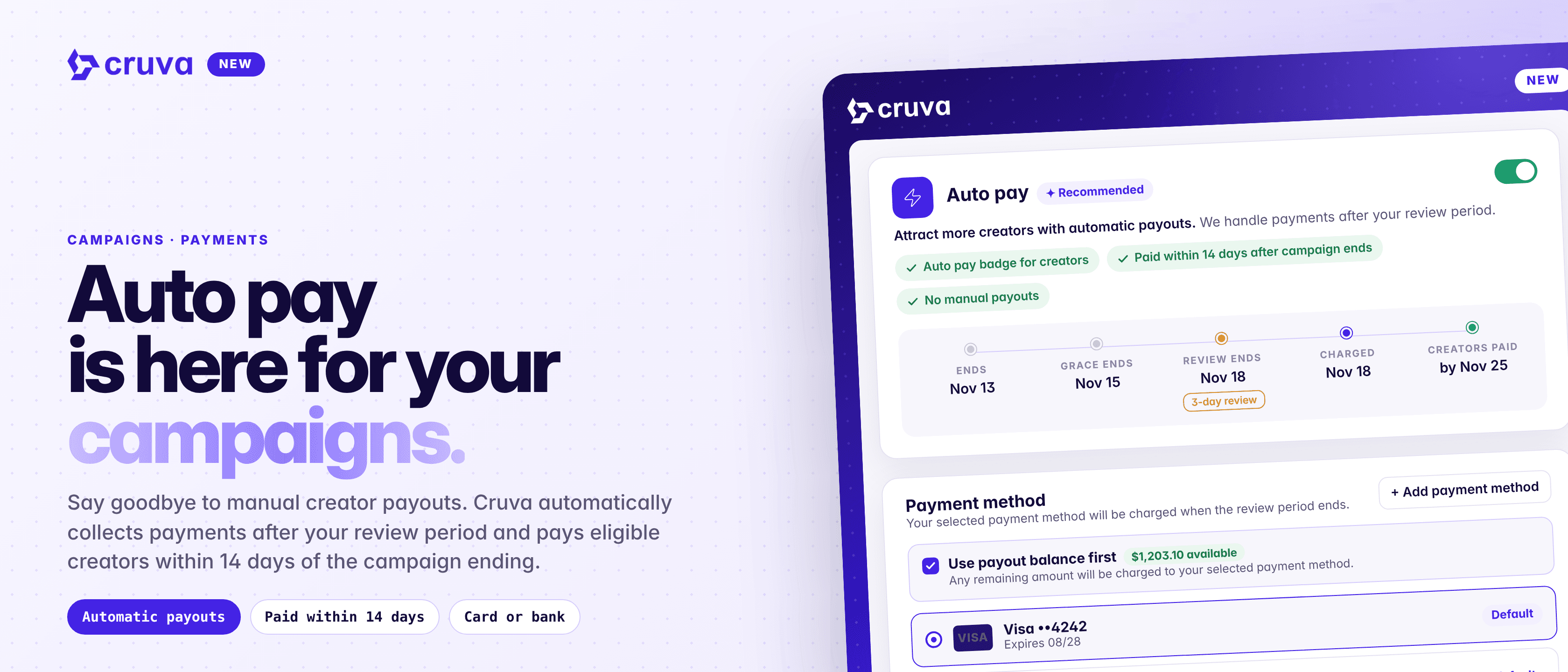
Cruva automatically collects payments after your review period and pays eligible creators within 14 days of the campaign ending.
Paying creators used to be a chore at the end of every campaign: work out what's owed, add funds, wait for them to clear, then come back and click Pay. Miss a step and creators wait, and overdue payouts can pause new launches.
Too many steps
Adding funds, waiting for them to clear and paying each creator are all separate jobs.
Guessing the amount
You top up your balance before you know exactly what the campaign owes.
Creators left waiting
When payouts slip, creators notice, and the next campaign is harder to fill.
Recurring means repeating
Weekly and monthly campaigns turn payouts into a job that never ends.
How it works
Auto pay is the Payments step of the campaign builder. It's on by default for new cash campaigns and only appears when the campaign pays cash.
- 1
Pick a payment method
Click Add payment method to save a card, or a US bank account for US shops, through Stripe. Your default method is preselected on new campaigns.
- 2
Set your review window
Choose from no review up to 5 days. The default is 3. The timeline on the Payments step shows the end date, when grace ends, when the review ends and the charge runs, and when creators are paid by.
- 3
Review results when the campaign ends
Any posting grace period runs first, then your review window opens. Disqualify any creator or video you don't want to pay before it closes.
- 4
Cruva charges and pays
When the window closes, Cruva charges your saved method for exactly what the campaign owes and pays every creator as soon as the funds clear: the same day for a card, a few business days for a US bank account.
Recurring campaigns are charged once per closed period. Campaigns that ended before you turned on Auto pay stay manual.
Auto pay is here for your campaigns.
What you and your creators see
During the review window, the campaign page shows a countdown banner with a Review results button, then a blue banner while funds clear, then green once everyone is paid. You also get a bell notice when the review window opens, when you need to verify a bank, and the day before the charge.
Creators see the same timeline and an Auto pay badge on the campaign, so they know when to expect their money.
Good to know
- Same fees as a manual deposit. A card carries Stripe's card rate plus a 2% Cruva fee. A US bank account has a 0.8% Stripe fee capped at $5, and no Cruva fee.
- Verify bank accounts first. A bank account entered manually waits on micro-deposits and shows Verifying bank until you finish. It can't be charged until then.
- Failed charges don't retry. You get a red banner, a bell item and an email with a Fix payment button. Retry with another saved method or deposit the amount manually, and creators are paid once the money is there.
- Easy to trace. Each Auto pay deposit carries an Auto pay chip in your deposit history naming the campaign it paid for.
Turn on Auto pay for your next campaign
Auto pay is on the Payments step of the campaign builder for every new cash campaign. Save a card or US bank account, set your review window, and Cruva handles the rest.