Turn TikTok Creators Into Shopify Affiliates
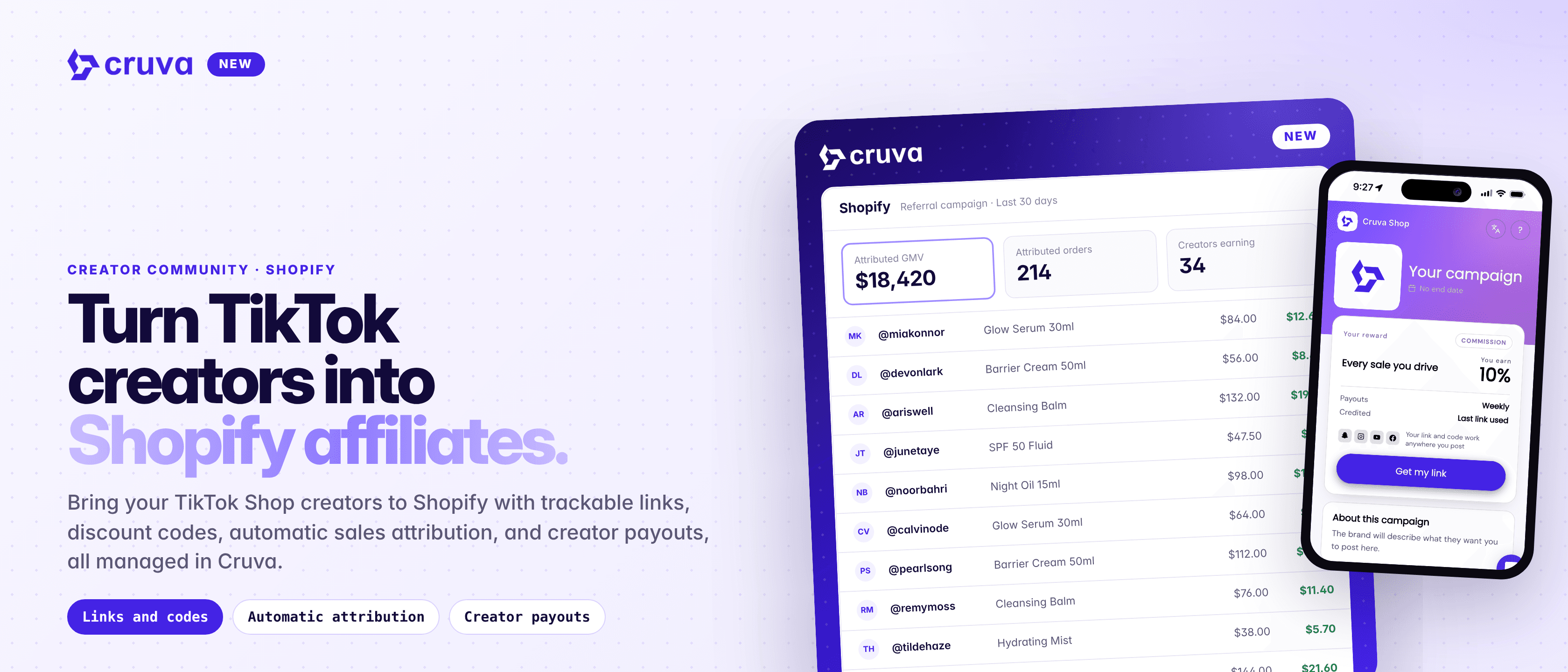
Bring your TikTok Shop creators to Shopify with trackable links, discount codes, automatic sales attribution and creator payouts, all managed in Cruva.
Your TikTok Shop creators can now sell your Shopify products too. Run a referral campaign right from Cruva: each creator gets their own trackable link and discount code, sales are credited back from Shopify, and you pay creators from your Cruva balance.
Creators you already have
Invite the creators already in your Cruva community. They join from one campaign page, with no new platform to sign up for.
Their own link and code
Each creator gets a trackable link for any product on the campaign and, if you turn it on, their own discount code built from their handle.
Sales credited from Shopify
Cruva reads Shopify's own record of each visit to credit the right creator. Nothing to install on your storefront.
You approve every payout
When a period closes, Cruva works out what each creator earned, minus refunds. You click Pay.
How it works
Connect your Shopify store, then open Creator Community > Shopify. It has its own workspace: Overview, Campaigns, Products, Requests, Samples and Payments.
- 1
Create a campaign
Go to Campaigns > Create campaign, name it, write what creators should know and pick the products they'll promote.
- 2
Set what creators earn
Combine a percent of sales, a flat amount per order and a one-off joining fee, paid the first time a creator earns. Choose a daily, weekly, biweekly or monthly period and an attribution window (7 days by default).
- 3
Add codes and a store-wide link
Optionally give each creator their own discount code, offer a store-wide link, and require approval to join. Requests land under Requests.
- 4
Share the campaign
Publish and use Copy creator link. Creators join, get their code straight away, and copy a trackable link for any product on the campaign, including ones you add later.
- 5
Pay creators
When a period closes, Cruva writes one pending payout per earning creator. Click Pay and it goes from your Cruva balance to that creator. Nothing pays itself.
Creators are always paid their full commission. Cruva's fee is 1.5% of attributed sales, billed on your Shopify invoice, so someone at the store approves the fee subscription in Shopify once. Do that before your first payout, because payouts are held until it's approved.
Turn TikTok creators into Shopify affiliates.
How a sale gets credited
Cruva reads Shopify's own record of the buyer's visit and looks for the strongest signal first: the creator's link, then the same code in utm_content, then the landing page, then their discount code. If a buyer used two creators' links, the most recent one inside the window gets the sale. Nothing has to be installed on your storefront.
Sales show up a few minutes after checkout, once Shopify finishes recording the visit, and refunds reduce what's owed on their own. Percent of sales is worked out on the order subtotal after discounts, without shipping or tax, and minus refunds.
More ways to grow with creators
- Discount codes your way. One code per creator credits a sale even without a link. One shared code credits sales through links only.
- A Brand Hub offer. Creators in your Brand Hub can take a Shopify link straight from your product cards, without joining a campaign.
- Creator tools. Let creators repost videos to Instagram Reels and auto-DM their link to commenters, starting from up to 10 templates you write. Turn on Review reposts to approve each Reel and caption first.
- Link products to TikTok Shop. On the Products page, link each Shopify product to its TikTok Shop listing so hub creators can take links and request samples, and Halo Effect can measure it.
- Pause or end safely. Pausing closes a campaign to new creators while existing links keep earning. Ending stops new earnings but never reverses sales already credited.
Launch your first Shopify referral campaign
Find it in Creator Community > Shopify. You'll need a connected Shopify store, a funded Cruva balance and Cruva's fee subscription approved in Shopify.