Introducing feature access for subaccounts
Control exactly which sections and features each subaccount can access.
Subaccounts could already be limited to some of your shops rather than all of them. Now they can be limited to part of the product as well. When you invite someone, Customize feature access lets you pick the sections they can open, and everything you leave unticked stays out of their sidebar.
Shop access was only half of it
Scoping a teammate to one shop still handed them every section of the product for that shop.
Not everyone needs everything
Someone brought in to run outreach has no reason to open your Meta ad account, your payouts ledger or your competitor research.
Roles answer a different question
Admin and User decide who can manage the team. Neither one says which parts of the product a person should be looking at.
A shorter sidebar is a faster one
When someone sees only the sections they work in, there is less to scroll past and less to open by mistake.
How it works
Feature access is set when you invite a subaccount, in the same dialog as the shop restriction.
- 1
Invite them by email
Dashboard > Users, then Add Subaccount. Enter their email address and they get a link to register and set their own password.
- 2
Pick the user type
Admin or User. An Admin covers every shop and can manage other teammates. A User gets full access to every section except billing and user management, which is the starting point the next two steps narrow.
- 3
Limit them to specific shops
Limit user to specific shops opens a shop picker. Leave it off and they work across all of them, as before.
- 4
Then choose what they can see
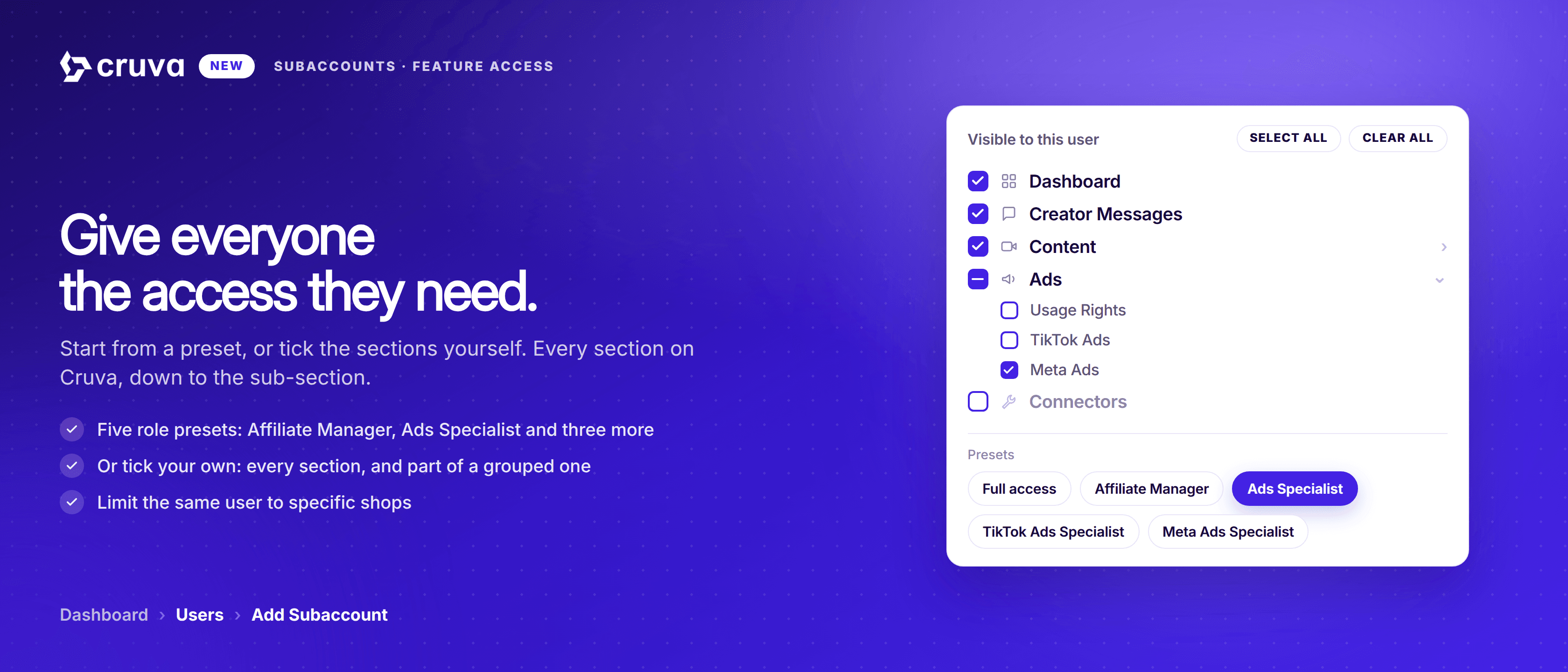
Customize feature access opens the section list, headed Visible to this user. Tick the sections this person should have, or start from either end with Select all and Clear all.
- 5
Go a level deeper where it matters
Sections holding several pages expand. Content splits into Videos, LIVEs and Carousels. Ads splits into Usage Rights, TikTok Ads and Meta Ads. Creator Community splits into Brand Hub with campaigns, retainers and creators, then Payments, Shopify and Discord. Twelve sections in all.
- 6
Check it from the list afterward
The Subaccounts table shows each teammate's shop access and feature access side by side, with Activity Logs when you need to see what someone actually did.
Shop access says where a teammate works. Feature access says what they work on.
Worth knowing
- Only owners and Admins can add teammates. An Admin can create Users but not other Admins, and cannot edit an Admin alongside them.
- Invites expire. An invite link is good for fourteen days. If one lapses, delete the pending user and add them again to issue a fresh link.
- Removing someone takes effect immediately. Delete them from Dashboard > Users and their access is revoked straight away, with no sync to wait for.
On the Subaccounts page now
Profile > User Management. An account can hold up to 500 subaccounts, and every important action a teammate takes is recorded in your audit log.