New Outreach Rules: What You Need to Know
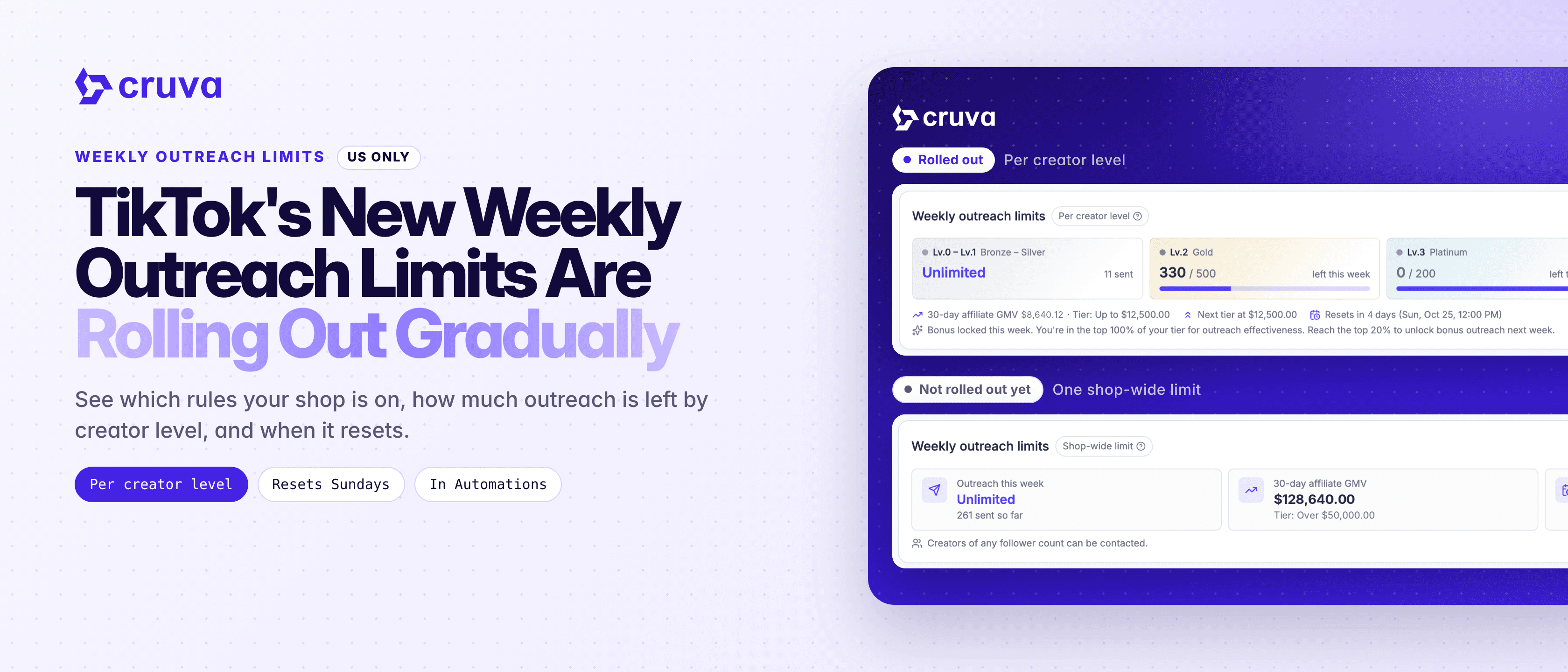
TikTok Shop is gradually moving shops to weekly outreach limits set per creator level.
TikTok Shop is changing how weekly outreach limits work. Instead of one limit for the whole shop, shops are gradually moving to limits set separately for each group of creator levels. TikTok decides when each shop moves, not Cruva, so two shops can be on different systems at the same time.
Two systems at once
During the rollout, some shops are on the new per-level limits and others are still on one shop-wide limit.
Limits by creator level
On the new rules, each group of creator levels has its own weekly limit, so you can run out for one group and still have room in another.
A bonus you have to earn
Part of the new limit depends on how many of your invitations turn into creator posts.
Hard to see in one place
Knowing which system you're on and what's left this week used to mean checking TikTok's Affiliate Center.
How the new limits work
Under the new rules, your weekly limit for each group of creator levels is a base limit plus an effectiveness bonus. In the US, the groups are Lv.0-1, Lv.2, Lv.3 and Lv.4-7. Outreach to Lv.0-1 creators is unlimited.
- 1
Check which system you're on
Go to Outreach > Automations and look at the badge next to Weekly outreach limits. Per creator level means the new rules apply. Shop-wide limit means your shop is still on the standard rules.
- 2
See what's left for each level
On the new rules, the Weekly outreach limits card shows a tile for each group of creator levels with how much outreach you have left. The same card appears at the top of Workflows.
- 3
Open More info for the details
More info on the card shows the full tier tables for your market, your shop's tier and answers to common questions.
- 4
Plan from the Creator step
When you build an automation, the Creator step reminds you how many creators you can still message this week. If your shop has a follower cap, you can set a max-followers filter there too.
Cruva reads and shows TikTok's limits. It doesn't set them and can't raise them.
Same outreach, new math: a base limit for each creator level, plus a bonus for invitations that turn into posts.
Base limit and effectiveness bonus
Your base limits come from your shop's 30-day affiliate GMV tier. On the new rules, even a shop with no affiliate GMV yet can reach some creators.
The bonus goes to shops in the top 20% of their GMV tier for effectiveness: how many invitations become creator posts over 14 days. Standing is checked on Sundays at 12 PM (GMT-7) and applies the following week. Missing the top 20% only locks the bonus. Your base limit isn't affected.
What stays the same on both systems
- Only new connections count. Outreach to creators you haven't connected with yet uses your limit. Creators who message you, reply or add your products don't.
- One creator, one spot. An invitation and a follow-up to the same creator in the same week count once.
- Weekly reset. Limits reset on Sundays at 12 PM (GMT-7), and unused outreach doesn't carry over.
- Standard rules still apply until you move. Shops on a shop-wide limit keep one weekly limit based on GMV tier, and a shop with no affiliate GMV can't send outreach.
The level groups above are for US shops. Other markets have their own tiers in local currency, listed under More info.
Check which outreach system your shop is on
Go to Outreach > Automations and look for the badge next to Weekly outreach limits. Open More info for your tier and the full tables for your market.