Introducing the Agency Suite
Manage campaigns, creators and payouts across all your shops in one place, and build your own creator network with Agency Hub.
Running creator programs for several brands no longer means switching shop by shop. The new Agency workspace brings your creators, campaigns, payouts and performance across all your shops into one place, and Agency Hub gives creators one link to every brand you manage.
One creator roster
Every creator across your shops in one list, with a creator who works with several of your brands counted once.
One hub for every brand
Agency Hub shows campaigns, products and videos from the brands you choose on a single link.
Campaigns and payouts together
See every shop's campaigns, balances and money owed without switching shops.
Compare brands at a glance
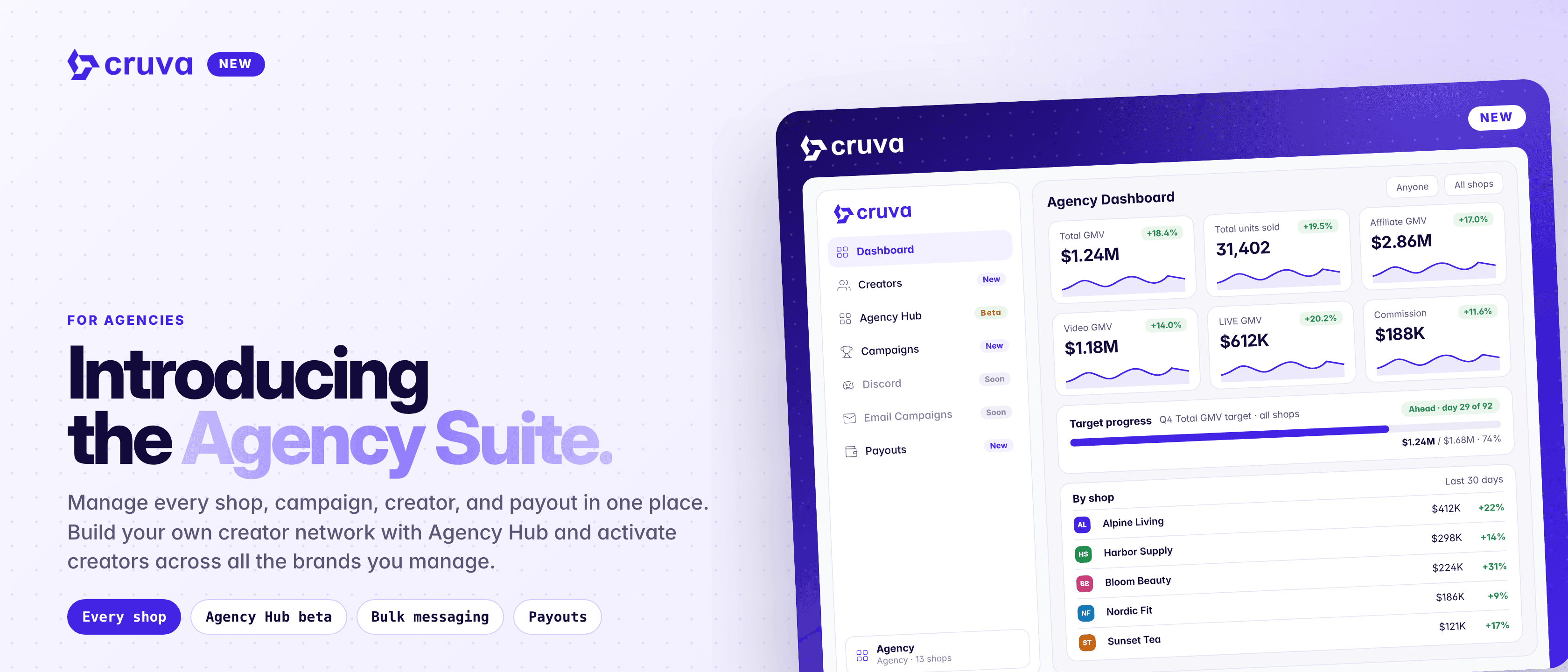
The agency dashboard adds up every shop, with a row per shop to compare them side by side.
How it works
Once your account has more than one shop, the shop switcher at the bottom of the sidebar becomes a workspace switcher. Pick Agency at the top and the sidebar swaps to tools that work across every shop you can reach.
- 1
Track every brand on the Dashboard
Stat cards add up every shop, and the Performance board lists each shop's GMV, outreach, samples and videos. Assign teammates to shops and filter by shop, tag or assignee.
- 2
Work your whole roster in Creators
My Affiliates for every shop at once, with the same filters. Use the shop filter to count only the shops you pick, switch between All creators and Community, tag, add to lists and export to CSV.
- 3
Broadcast for any brand
Click Broadcast on Creators, choose a brand, and email its whole community or post to its Discord or Lark, without switching shops.
- 4
See every campaign and payout
Campaigns lists every shop's Contests and Retainers in one place, with an Owed only filter. Payouts shows each shop's balance, money owed and payout history.
- 5
Launch your Agency HubBeta
Pick the brands, campaigns and products to show, add your agency's name and logo, and share one link, creators.cruva.com/a/your-agency.
Pages that act on one TikTok Shop, such as Creator Messages, Outreach and Affiliate CRM, stay in each shop's own sidebar. Pick a shop in the switcher to open them.
Every shop, campaign, creator and payout in one place.
Agency Hub: one link for every brand
Agency Hub is a Brand Hub for your whole agency, with campaigns, products, programs, videos and a Top Affiliates leaderboard from the brands you choose. Creators can filter by brand or tap one to open its own Brand Hub.
Because TikTok Shop is region-locked, creators see one region at a time, normally their own market, and you can change the copy for each region. Joining the Agency Hub saves it to a creator's My Brands. They join a brand by opting into one of its campaigns, and payouts stay with each brand's campaign.
Good to know
- One currency for the whole view. Pick a currency at the bottom of the sidebar, and the Dashboard and Creators convert each shop's sales at the day's rates.
- Broadcasts reach the brand's whole community. An agency broadcast goes to everyone in that brand's community with an email address, not only the creators on screen.
- Your own shops. Agency Hub shows shops your account owns. Shops shared with you from another account don't appear.
- More on the way. One Discord server and email campaigns across all your brands are coming soon.
Open the Agency workspace
Pick Agency in the workspace switcher at the bottom of the sidebar. It appears when you can reach two or more shops, and team members need access to the Agency Dashboard.