Your Carousels Just Got Smarter
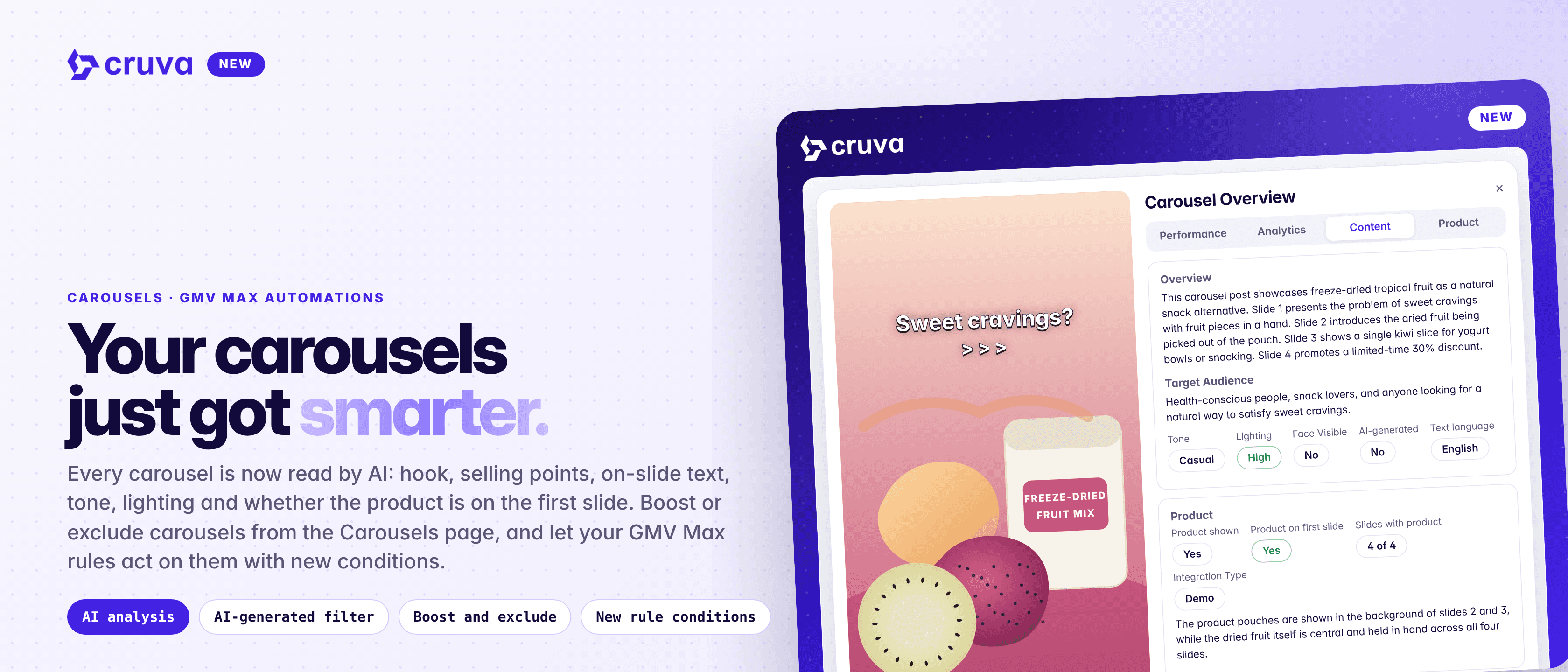
Carousels now get AI analysis, an AI-generated filter, and one-click boost or exclude from GMV Max, and GMV Max exclusion rules can act on carousels with a new set of conditions.
Carousels sell like videos, and now you can work with them like videos too. Open any analyzed carousel to see what it says and how it shows your product, filter out AI-generated ones, and decide which carousels run in your GMV Max campaigns, by hand or with rules.
AI analysis for carousels
Hooks, selling points, on-slide text, tone, lighting and whether the product is on the first slide.
Spot AI-generated posts
Filter the Carousels page by AI-generated, the same way you already can for videos.
Boost or exclude in a click
Send a carousel to GMV Max, or pull it out, right from the Carousels page.
Rules that cover carousels
Point exclusion rules at videos, carousels or both, with new conditions to match on.
How it works
Everything starts on Content > Carousels. Rules live under Ads > TikTok Ads > Automations.
- 1
Open a carousel's analysis
Click a carousel's thumbnail and open the Content tab. It shows the overview, target audience, tone, lighting, whether a face is visible, whether it's AI-generated and the text language, plus whether the product is shown, on the first slide, and on how many slides.
- 2
See what's working on the slides
Hooks and Top Selling Points come with scores, and On-slide text shows the words on each slide.
- 3
Filter by AI-generated
Use the AI-generated filter on the Carousels page to show only AI-generated carousels, or hide them.
- 4
Boost or exclude from GMV Max
Choose Boost or Exclude from GMV Max on the Carousels page. They show up in the Boosted creatives and Excluded creatives tabs, the same as videos.
- 5
Let a rule do it
In Create rule, pick which content types an exclusion rule covers: Video, Carousel or both. Both is the default and also covers any post type added later.
Rules only work on Product GMV Max campaigns, and exclusions only on auto-selection Product GMV Max campaigns. Excluding a carousel stops TikTok using it as an ad creative. The organic post isn't touched.
Your carousels just got smarter.
New conditions for your rules
The condition picker has new options built on the same AI analysis, each marked New: Face visible, Misleading claims, Product in first 3s, Product screen time, Integration type, Lighting, Tone and Language. Video length and Transcript are marked Videos only, because carousels don't have them.
Combine them with performance conditions like Spend, ROI and Orders, using AND or OR, to keep creatives out of your ads that don't fit your brand.
Ways to use it
- Brief better carousels. See which hooks and selling points score well on the slides that sell, and put them in your next brief.
- Keep AI content out of ads. Filter carousels flagged as AI-generated and exclude them from GMV Max in one pass.
- Back your best carousels. Boost a carousel that's selling straight from the Carousels page.
- Set it once. An exclusion rule set to Both keeps checking videos and carousels on every sync.
Put your carousels to work
Find carousel analysis, the AI-generated filter and GMV Max actions on Content > Carousels. GMV Max automation rules are on the Scale plan and need your TikTok Ads account connected.