Build Workflows Around Campaigns
Turn campaign activity into Workflows, from joins to wins and retainer stages.
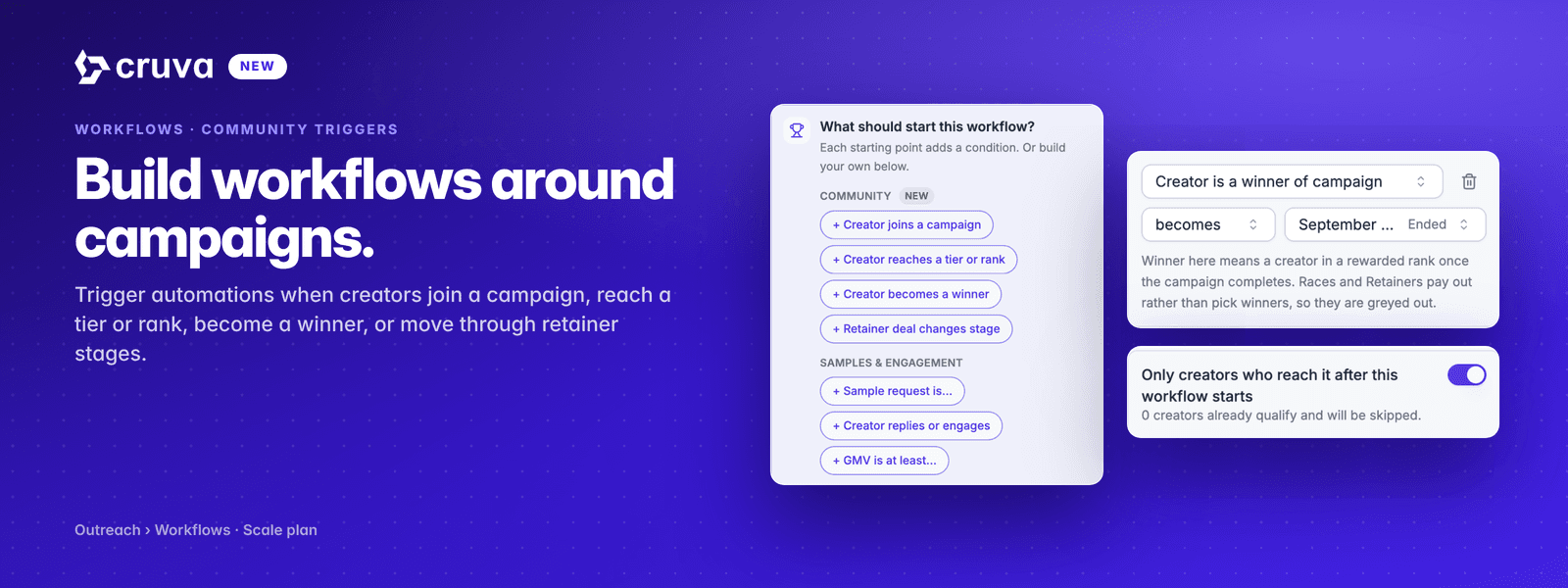
A workflow can now start from one of your community campaigns. Four new starting points sit in the Trigger step: a creator joins a campaign, reaches a tier or rank, becomes a winner, or moves to a new retainer stage.
Open a workflow's Trigger in Outreach > Workflows. The What should start this workflow? panel has a Community group at the top holding the four starting points, and picking one adds the matching condition for you. Choose the campaign, then the operator, then the tiers, ranks, milestones or stages you care about. Rows can point at different campaigns.
The four starting points
Joins a campaign
The creator becomes an approved participant of a campaign you pick. The field is Creator is in campaign, with the joins operator.
Reaches a tier or rank
A tier in a Contest, a rank in a Leaderboard, or a completed cell or line in Bingo. The field is Creator's progress in campaign, with reaches.
Becomes a winner
Winner means a creator in a rewarded rank once the campaign completes. Contests, Leaderboards, Bingo and Sweepstakes pick winners. Races and Retainers pay out instead, so they are greyed out here.
Moves to a new retainer stage
A Retainer deal changing stage, also on Creator's progress in campaign with reaches.
Events, not states
Joins, reaches and becomes fire the moment something changes, and they exist only on the Trigger. A Recurring Trigger, a Condition step and a Wait Until all ask what is true right now, so those use is in, is any of and is instead.
Messages that know where the creator is
Message copy in the workflow can use {{campaign_name}}, {{tier_name}}, {{next_tier_name}} and {{next_tier_threshold}}, so a creator who just hit a tier can be told what they reached and what the next one takes. The text after a pipe is what creators already at the top tier see instead. With more than one campaign in the trigger, each field names the campaign it reads.
Worth knowing
- Only creators who reach it after this workflow starts is on by default, so activating does not message everyone who already qualifies. The preview tells you how many that would be, and you can turn it off to let them in.
- A creator enters once per tier per campaign, even if their progress dips after a refund and comes back.
- Progress follows your CRM sync, so a move shows up within hours rather than instantly.
- Leaderboard ranks change all day, so they cannot be reached. Use becomes a winner for final placements.
- is not in is the invite pattern: reach the creators who have not joined a campaign yet.