Let Your Creators Recruit Creators
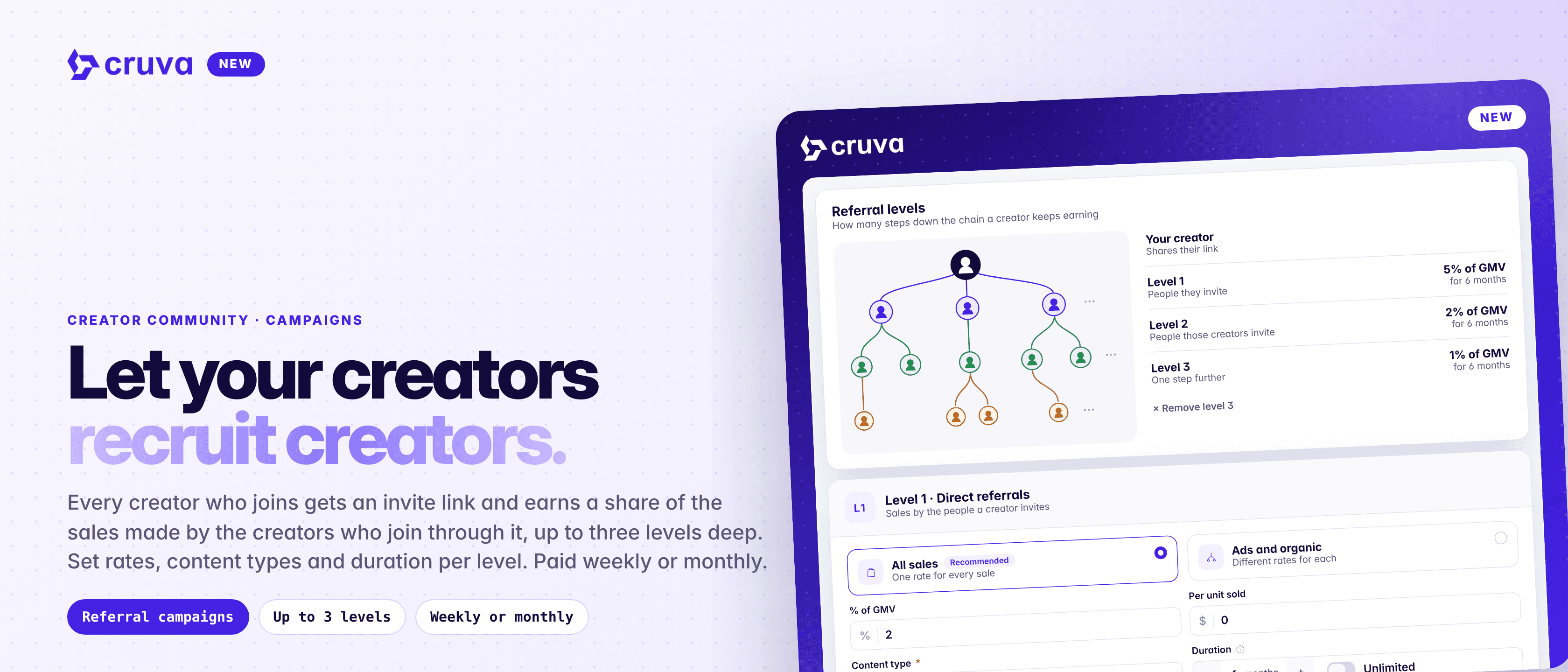
Referral campaigns give every creator who joins an invite link, and pay them a share of the sales made by the creators who join through it.
Your best creators know other creators. Referral is a new campaign type that pays them for bringing those creators to you: each creator gets their own invite link and earns a share of what the creators they invite go on to sell for your shop.
An invite link for every creator
Everyone who joins gets a link to share, with Copy and Share invite right on the campaign page.
Up to three levels deep
Pay on the creators they invite, the creators those creators invite, and one step further.
Rewards new demand
By default, a referral only pays for creators who haven't sold for you in the last 30 days.
Runs on its own
No end date. It pays out every week or every month until you stop it.
How it works
In Creator Community > Campaigns, click Create and choose Referral under Select Campaign Type. For example: "Earn 5% of the sales of every creator you invite, and 2% from the creators they invite."
- 1
Set your levels
On Goals & rewards, click Add level to pay up to three levels deep. Level 1 is the people your creator invites, level 2 the people they invite, and level 3 one step further.
- 2
Choose each level's rates
Set a % of GMV, a per-unit rate, or both. Use All sales for one rate, or Ads and organic to pay organic and ads sales differently. Copy level 1 settings fills in the next level for you.
- 3
Pick content types and duration
Choose which of the invited creator's content counts (video, LIVE, carousel) and how long their sales keep earning, or turn on Unlimited.
- 4
Decide who counts as a referral
Leave it on to pay only for creators with no sales for your shop in the last 30 days, change the number of days, or turn it off to count everyone who joins through a link.
- 5
Set the schedule and launch
Pick a start date and a weekly or monthly payout cadence. Pay with Auto pay, from the payout panel, or one creator at a time from the participants table.
A creator's own sales never earn them a referral reward, and referral rewards never count as sales. One sale can earn up to three referrers, one at each level.
Let your creators recruit creators.
What creators see
Before joining, creators see the rate for each level, how long sales count and how often they're paid. Once they've joined, they get their invite link, plus Your Earnings, with their next payout, total earned and what each level has earned them.
Creators You Invited lists everyone below them by level, whether they joined through the creator's own link or via someone else, and what each has earned them. Creators see the same amounts you're asked to pay.
Track your network
- Who referred whom. The participants table shows each creator's Referred by, or Joined directly. Click the name to jump to that creator.
- Earnings by level. See what each creator has earned from each level, how many creators they have there, and those creators' sales.
- Referrers are fixed. A creator's referrer is set when they first join and can't change. Creators who join from your own invite or the campaign page have no referrer.
- Safe to adjust. Editing rates changes the amounts for periods that haven't been paid or charged yet. Paid periods don't change.
Launch your first Referral campaign
In Creator Community > Campaigns, click Create and choose Referral. Set up to three levels, pick a weekly or monthly payout, and share the campaign with your creators.