More Insight Into Every Creator
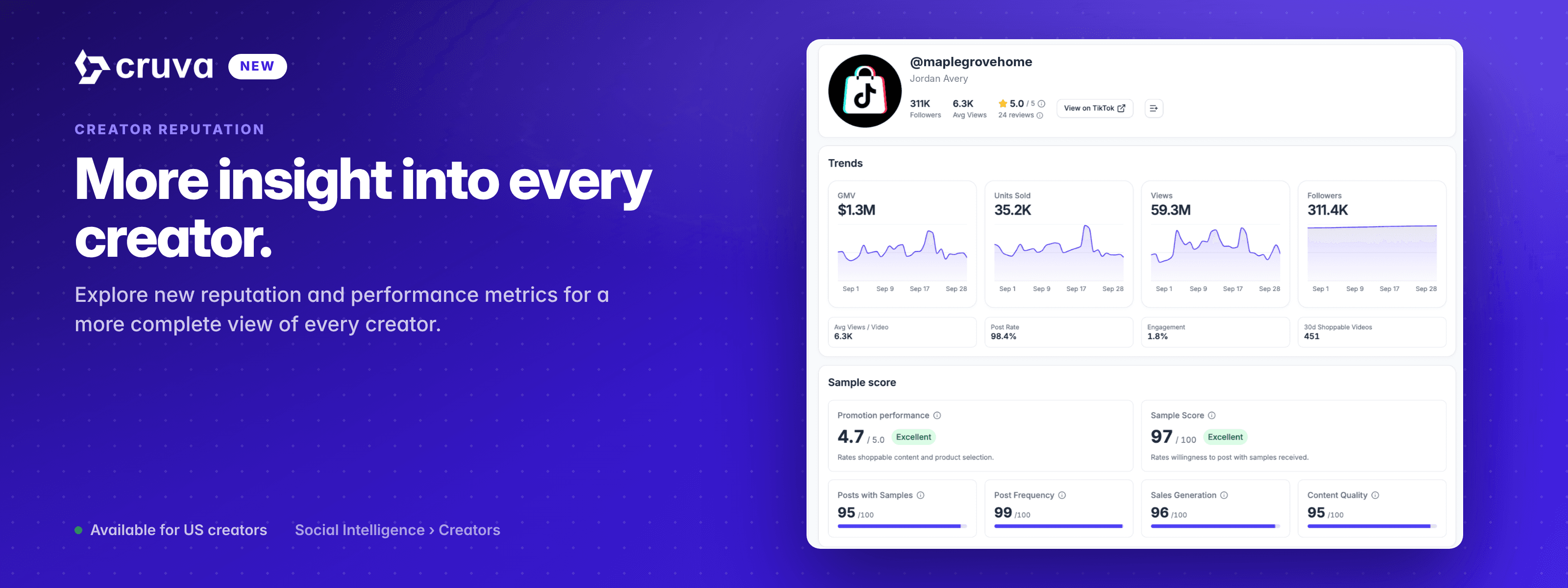
Explore new reputation and performance metrics for a more complete view of every creator.
Reputation is a new class of creator metrics: two headline ratings and the four signals behind them. They turn up wherever you already look at creators. There is a new Reputation tab in creator filters, and every creator now has a full detail page you can open from anywhere their handle appears, rebuilt around six tabs so public performance, reputation and your own relationship data sit together.
Size is not suitability
Followers and GMV tell you how big a creator is. How they behave once your product is in their hands is a separate question, and there is now a good deal more than a fulfillment rate to answer it with.
You are betting on behavior
Sending product is a wager, and what you are wagering on is how someone acts afterward rather than how large their audience is.
Research and your own history sat apart
What the market knows about a creator lived in one place. Whether they are in your community, and what you last said to them, lived in another.
A shortlist needs a filter
Judging creators one profile at a time does not scale to a list you are trying to cut down to a handful.
How it works
Reputation is a tab in Creator filters and a section on every creator's Overview. The same six metrics drive both.
- 1
Filter by Reputation
In AI Creator Search, open Filters and pick the new Reputation tab, alongside Performance, Demographics and Appearance. Set a range on any of six metrics: Creator Rating, Sample Score, Posts with Samples, Post Frequency, Sales Generation and Content Quality. Filters apply automatically as you change them.
- 2
Read the two headline ratings
Promotion performance is the Promotion Performance Score, or PPS, out of 5. It measures how well a creator has met TikTok Shop's standards for content and product selection, and a low score points to a higher likelihood of dissatisfaction, refunds or negative reviews. Sample Score is out of 100 and rates willingness to post with samples received. Each carries a plain word for the band it falls into.
- 3
Then the four signals behind them
Posts with Samples is how often the creator posted with the samples they received, and the quality of that content. Post Frequency counts videos and LIVEs, shoppable and regular alike. Sales Generation is shoppable content only: sales volume, clicks and conversions. Content Quality covers full-duration views, engagement rate and other indicators across both kinds of post.
- 4
Every creator has a full detail page
Six tabs on every creator. Overview holds the profile, the Sample score section and the brands they sell for. Trends covers GMV, units sold, views and followers across the date range you pick. Brands lists which shops they sell for, with GMV, views and videos. Products shows product performance. Videos switches between All Videos and just My Shop Videos.
- 5
Your own data, beside the public metrics
The CRM tab shows whether the creator is in your community, their contact details, your notes and the campaign messages you have sent them. Market research and your relationship with someone stop being two separate lookups.
- 6
Open it from anywhere
Any creator handle in Cruva opens the same full profile. Hit Open full profile on an AI Creator Search result, or open a creator from Social Intelligence. The scores live on the full page rather than in the preview drawer.
Followers tell you how far a creator reaches. Reputation tells you what happens after you send the sample.
Worth knowing
- Available for US creators. Reputation metrics and the improved creator page are rolling out in the US first.
- Social Intelligence plan gating is unchanged. Viewing the data needs the Growth plan or higher, and saving creators from it into a list needs Scale.
On every creator page now
Open any creator handle and hit Open full profile to see their scores, or set a range on the Reputation tab in AI Creator Search filters.